
Welcome to the first post in my new series, JS in Small Bites: Intro to JavaScript. The goal here is simple: break JavaScript down into small, digestible lessons that you can follow along with, whether you are a beginner or a programmer who needs a quick refresher.
When I was starting my programming journey, tutorials often felt like they were either too shallow (“just copy-paste this code and it works”) or too overwhelming (pages of theory before you even see a line of code). Here I will strike a balance: real-world examples, simple explanations, and small projects you can start building right away.
Buckle up and let’s get started.
What is JavaScript?
JavaScript (JS for short) is the language of the web. If you have ever clicked a button and something happened on a website, that was probably JS at work. Today, JavaScript is not just limited to the browser: developers use it to build server applications (with Node.js), mobile apps (with React Native), and even experiment with machine learning.
Think of JS as the glue that makes vanilla HTML and CSS interactive. Without JS, a webpage is just text and style. With JS, it becomes alive.
Here is a fun experiment: try going into your browser settings and turning off JavaScript. Then reload your favorite sites. You will quickly notice that most of them either break completely or do not load at all. That is how deeply the modern web depends on JavaScript.
Why learn JavaScript now?
You might be wondering: there are so many programming languages out there, why JavaScript? Here is why it is still one of the best choices in 2025:
- Beginner-friendly – You do not need anything special. All you need is a browser and a text editor.
- Job market – JS is still one of the most in-demand languages. Web developers, full-stack engineers, and front-end devs all rely on it.
- Versatility – Learn it once, and you can branch into web, mobile, or even backend.
- Community & resources – Millions of people use JS daily, meaning tons of tutorials, forums, and open-source code to learn from.
If you are learning to code in 2025, JS is still one of the most valuable skills you can pick up.
Hello, JavaScript!
Right now, the fastest way to start writing JavaScript code is with an online compiler. At this stage, it is better to focus on learning the syntax and basic logic instead of worrying about setup. Later on, we will look at how to run JS locally on your computer.
One of my favorite online compilers for any programming language is Programiz.
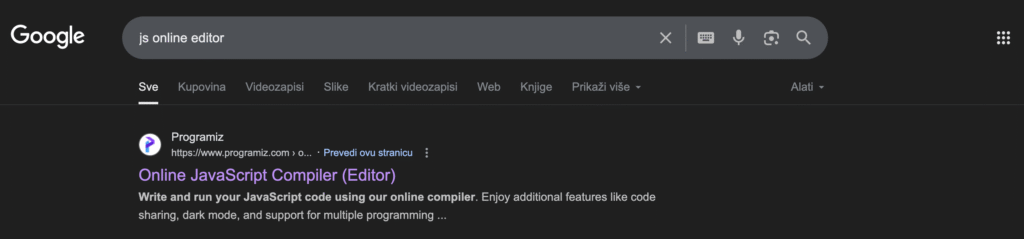
When you open their JS compiler, you will probably see something like this:
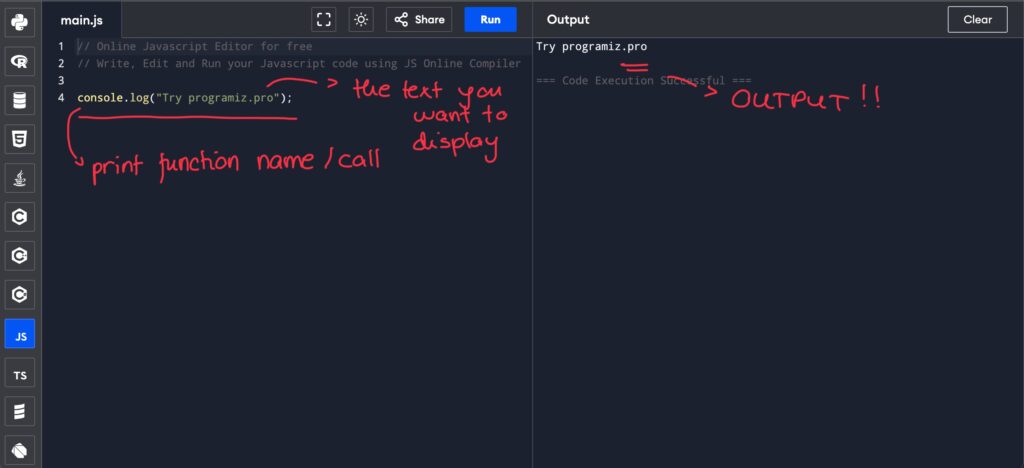
console.log is a built in JS function that prints something to the console so the user (or developer) can see it.
Let’s change this line to print your name instead:
console.log("Hello, Irma!");Run it again. Now the console says hello back to you. That is the magic of code: even the tiniest change is something you created!
Once you get comfortable with the syntax, data types etc., we will also look at how to run JavaScript inside a simple file on your computer. But for now, you can experiment directly in the online editor.
Operators
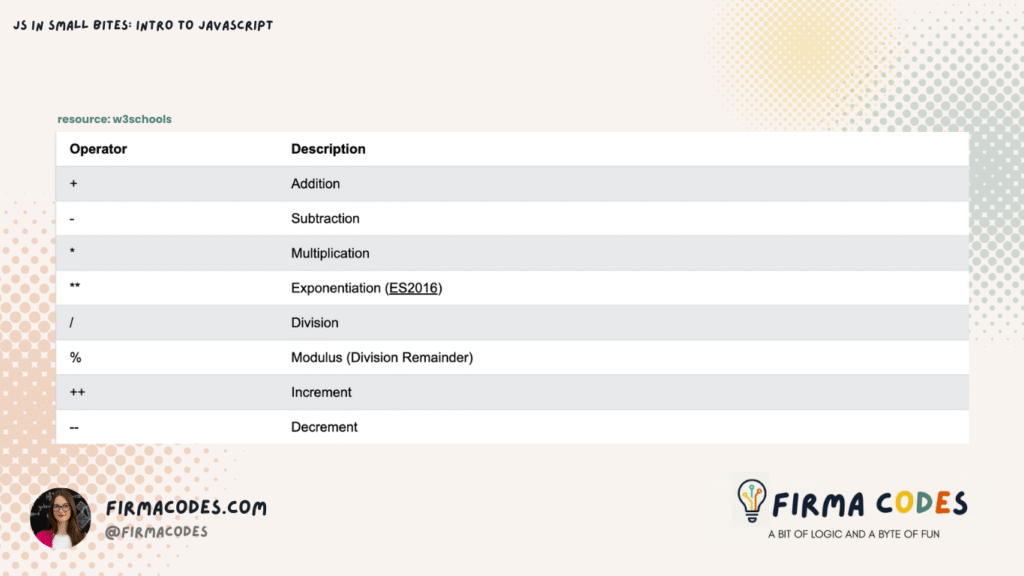
Operators are symbols that let us perform actions on values and variables.
Print, Variables and Data types
Let’s play with some basics. In JavaScript, a variable is like a little container where you can store information: numbers, words, true/false values, or even lists of things. Whenever you want to use that data later in your code, you refer to the variable instead of typing the value again.
There are three main ways to declare variables in JS:
let name = "Irma";     // can be changed later
const pi = 3.14;       // cannot be changed
var age = 18;          // old-school, usually replaced by let
- let: The most common way to store something you might want to change later.
- const: Use this for values that should never change.
- var: The older way to declare variables, it still works, but it is better to stick with let and const for modern JS.
Think of a variable as a label on a box. You put something inside, and whenever you need it, you can grab it by its name.
Data Types you will use the most
In JavaScript, data types tell the computer what kind of information you are working with. Different types of data behave differently, and knowing them helps you write code that works the way you expect.
- Numbers: 42, 3.14 — any kind of numeric value you can do math with.
- Strings: “hello” — text wrapped in quotes.
- Booleans: true or false — simple yes/no values.
- Arrays: [1, 2, 3] — lists of items stored together.
- Objects: {name: “Irma”, age: 19} — more complex containers with named properties.
let username = "Alice";  // string
let score = 100;         // number
let isOnline = true;     // boolean

console.log(username, score, isOnline);
Here, username stores text, score stores a number, and isOnline stores a true/false value. When we print them with console.log, we can see all the different types of data we are working with.
Conditional Statements
Sometimes in code, we want to make decisions based on certain conditions: “If this happens, do that; otherwise, do something else.” In JavaScript, we use conditional statements (if, else if, else) to handle these decisions.
let age = 20;

if (age >= 18) {
  console.log("You are an adult.");
} else {
  console.log("You are a minor.");
}
Here, the code checks the person’s age. If it is 18 or more, it prints “You are an adult.” Otherwise, it prints “You are a minor.” What do you think it will print out in this example? 🤔
Now, imagine you are building an online clothing store, and you want to give a discount to users based on how many items they buy:
let itemsBought = 7;

if (itemsBought >= 10) {
  console.log("You get a 20% discount!");
} else if (itemsBought >= 5) {
  console.log("You get a 10% discount!");
} else {
  console.log("No discount, but thanks for shopping!");
}- If a customer buys 10 or more items, they get 20% off.
- If they buy 5–9 items, they get 10% off.
- If they buy fewer than 5, no discount applies.
Conditional statements help your code react to different situations, just like decisions in real life.
Loops
Sometimes, we want to repeat the same functionality over and over again in code. Instead of copying the same line several times, we use a loop to repeat tasks automatically. Loops make our code cleaner and easier to maintain.
Think of it like a robot following instructions:
“Do this step. If the condition is still true, repeat. Otherwise, stop.”
Example: Counting
for (let i = 0; i < 5; i++) {
  console.log("Count:", i);
}- let i = 0; start counting from 0
- i < 5; keep looping (repeating the same action) as long as i less than 5
- i++ or i = i + 1; each time increment i by 1
This prints:
Count: 0
Count: 1
Count: 2
Count: 3
Count: 4
Project 1: A simple calculator
Time to put the basics together. Let’s make a simple calculator!
let num1 = 10;
let num2 = 5;

let sum = num1 + num2; //creating a variable, using js operators
let difference = num1 - num2;
let product = num1 * num2;
let quotient = num1 / num2;

console.log("Numbers:", num1, "and", num2); //printing the numbers
console.log("Sum:", sum); //printing the sum result etc.
console.log("Difference:", difference);
console.log("Product:", product);
console.log("Quotient:", quotient);
When you run the code in the editor you should see this:
Numbers: 10 and 5
Sum: 15
Difference: 5
Product: 50
Quotient: 2
What to expect from this series
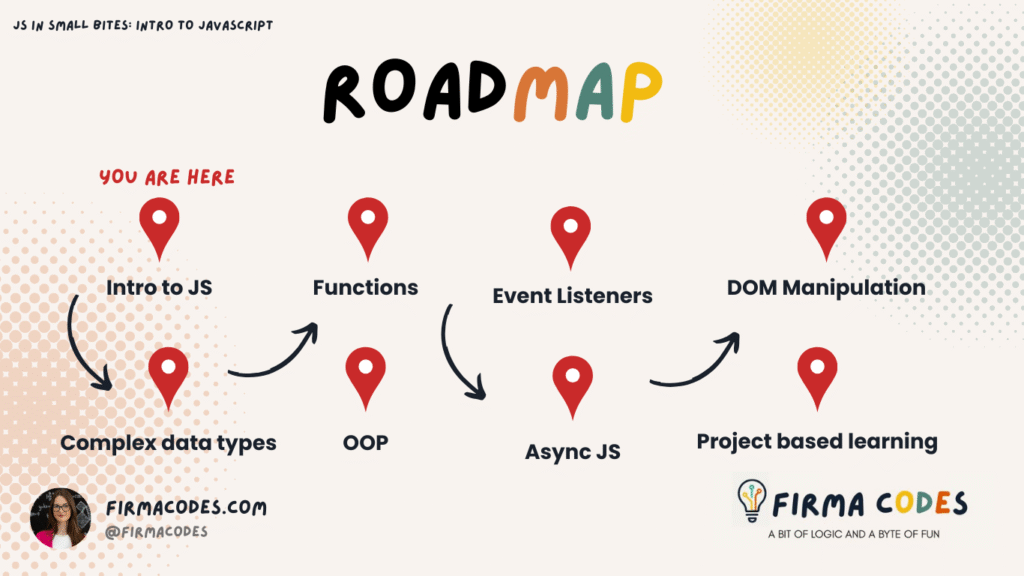
This is only the beginning. With “JS in Small Bites“, I want to keep things straightforward. We will go step by step, learning things like:
JS in Small Bites: ROADMAP
Resources
If you are enjoying JS in Small Bites and want to keep learning alongside me, here is where you can find more:
- 🖥️ GitHub: Browse my projects, code snippets, and experiments.
- 📸 Instagram: Coding tips, behind-the-scenes, and my developer journey.
- 💼 LinkedIn: Tech updates, networking, and professional milestones.
- 🌐 Portfolio: Explore all my work in one place.
I would love to hear what you think about learning JavaScript this way, drop me a message anytime!